Tap + on the Recipes tab and paste a recipe URL. Use the URL from your browser’s address bar - not links copied from social share buttons, which won’t resolve to the recipe directly. If a site blocks automated access, tap “Paste recipe text instead” and paste the recipe text.
No. Larder imports from recipe URLs and pasted text only. Paprika exports, Instagram posts, and YouTube videos don’t contain structured recipe text Larder can work with. For recipes from other sources, copy the text and use the text import option.
Yes. Long-press any ingredient or step to edit it. To delete a recipe, long-press the recipe card in the Recipes tab.
Most kitchen apps let you log weights, expiry dates, nutritional values, and meal plans. They’re impressively thorough - and the apps you stop opening after two weeks because maintaining them became a second job. Larder asks one question: do you have this or not? Keep your stock levels roughly current and your Fresh This Week updated, and the Recipes tab tells you what you can cook tonight. That’s the meal plan, without the overhead.
We’ve tested most major recipe websites and the vast majority import cleanly. Sites that block automated access - including Food52, Smitten Kitchen, The Kitchn, Saveur, Donna Hay, and Delish - won’t import by URL. For these, use the “Paste recipe text instead” option and paste the recipe text.
Your purchase is tied to your Google account - reinstall Larder on any Android device logged into the same account at no extra cost. Your pantry and recipes are stored locally, so back up to Google Drive in Settings before switching devices, then restore on the new one.
Your pantry and saved recipes are always available offline. Importing new recipes requires an internet connection - Larder sends the recipe text to Claude to restructure it into mise en place format.
Get in touch at hello@misego.app.
The founding price of $24.99 is for the first 100 cooks who use Larder seriously, cook across cuisines, and aren’t afraid to say what’s missing. Their feedback shapes what Larder becomes. After the first 100, the price moves to $49.99.
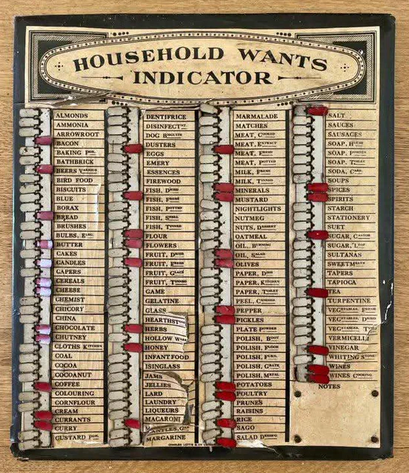
The Victorian household wants indicator - a board mounted in the kitchen, one slider per staple, flipped when something ran low - is the oldest version of this idea. Before heading to the market, the person doing the shopping simply read off the marked items. Larder is that. For a kitchen that cooks across a dozen cuisines, on a phone - and your curated recipe vault that helps you decide what to replenish